Remembers your day. Drafts your replies. Types what you say.

Answers to you alone.

An AI that lives on your Windows PC. Screen memory, meeting transcripts, your files and every inbox — all searchable, all encrypted on your own disk. Cloud AI is optional; switch it off and nothing is sent for processing.

No credit card · Working in two minutes
On-device AES-256 encrypted Cloud AI is optional
5:10

Ask about anything you've seen, heard, read or said. It remembers.

What did I quote Acme?
$48,000 — in Acme-2024.pdf
When did Dana last message me?
Tuesday 4:12pm — about the kickoff.
Where's the latest budget spreadsheet?
On your laptop: Finance/Q3-budget.xlsx, edited yesterday.
Privacy

It all stays on your machine.

On-device Encrypted Cloud AI is optional

If we vanished tomorrow, your archive wouldn't. It's a file on your PC — yours, encrypted, portable.

Privacy by architecture

Local where it can be. Encrypted where it can't.

Desktop data never leaves your device. Channels pass through an encrypted relay and land on your machine — then we delete our copy. We never train on any of it.

Tier 1 — Local (your machine)
  • Screen contenttext only · images read then discarded · saved screenshots optional
  • Documents & filesindexed locally
  • Meeting transcriptson-device, no network
  • Vector embeddingscomputed on-device
  • Local AIQwen 3 — default
Stays on your machine. Always.
Tier 2 — Relay (encrypted, transient)
  • Emaildeleted after sync
  • Slack / Teamsdeleted after sync
  • SMS / Telegramdeleted after sync
  • Calendarread-only
  • Cloud AIGroq ZDR, optional
Relayed, then deleted. It lives on your device.
The honest comparison

Everyone else solves one piece.

Screen, files, meetings, and every channel — in one private memory you can question from anywhere.

Feature MyHandler Littlebird Rewind Granola Wispr Flow
On-device file indexing
All your channels, not just email
Reachable by text from anywhere
Runs agents on a schedule for you
Voice dictation into any app
Your voice processed on your device cloud
Live translation as you dictate 30 languages after, by command
Desktop data: truly local
Still independent acq. Meta

Rewind / Limitless was acquired by Meta in December 2025. Wispr Flow processes audio on cloud servers; translation is a separate voice command on already-dictated text.

Pricing

$19/month for your own
AI chief of staff.

A human EA costs $60–120K/year. Our AI assistant costs $19.99/month — and covers email, meetings, screen, and much more. No credit card to start.

Free
$0
forever

See what your Handler can do.

About 50 AI chats a month 300 credits
Get Started
Most Popular
Personal
$19
/ month

For professionals who mean business.

About 330 AI chats a month 2,000 credits
Get Started
Business
$39
/ month

Full power. Zero compromises.

About 830 AI chats a month 5,000 credits
Get Started
Executive
$79
/ month

Your Handler, fully unleashed.

About 2,500 AI chats a month 15,000 credits
Get Started
Credits / mo 300 2,000 5,000 15,000
AI classifications / mo 250 500 1,000
Connected channels 3 8 25 Unlimited
Calendar features (flag)
Smart screening (flag)
Voice minutes / mo (rounded up) 1 10 30 60
Connect your AI tools (MCP)
Free
$0 forever
About 50 AI chats a month
Get Started
  • 300 credits / mo
  • 3 connected channels
  • Calendar features (flag)
  • 1 voice minutes / mo (rounded up)
Most Popular
Personal
$19 / month
About 330 AI chats a month
Get Started
  • 2,000 credits / mo
  • 250 ai classifications / mo
  • 8 connected channels
  • Calendar features (flag)
  • 10 voice minutes / mo (rounded up)
Business
$39 / month
About 830 AI chats a month
Get Started
  • 5,000 credits / mo
  • 500 ai classifications / mo
  • 25 connected channels
  • Calendar features (flag)
  • 30 voice minutes / mo (rounded up)
  • Connect your AI tools (MCP)
Executive
$79 / month
About 2,500 AI chats a month
Get Started
  • 15,000 credits / mo
  • 1,000 ai classifications / mo
  • Unlimited connected channels
  • Calendar features (flag)
  • 60 voice minutes / mo (rounded up)
  • Connect your AI tools (MCP)

What's a credit?

One credit is one unit of cloud AI work. Your plan's credits cover everything you ask your Handler to do in the cloud:

  • 6 a chat
  • 3 a Ghostwriter draft
  • 1 a minute of cloud transcription
  • 8 a step when your Handler works a task

Run out and nothing stops. Your Handler keeps working on your own device — chat, dictation and transcription simply switch to the on-device AI until your credits reset. On-device AI is unlimited and free, always. Background work like screen reading and message sorting never touches your credits at all.

Questions

Asked, answered.

Your screen activity, meeting transcripts, and files are captured, processed, and stored in an encrypted database on your machine. Email and channels sync down to your device through an encrypted relay that deletes its copy once delivered. With Cloud AI off, nothing is ever sent out for processing.

No. It never acts on your behalf and never sends anything. It drafts a reply only when you explicitly ask — and you decide what happens next.

Yes. Message it on Telegram or SMS and ask about your own data — "what did I quote the Acme job?", "when's my next meeting with Sarah?" The answer is pulled from the data on your own computer and sent back on the same channel. It also reaches out to you that way when something needs your attention.

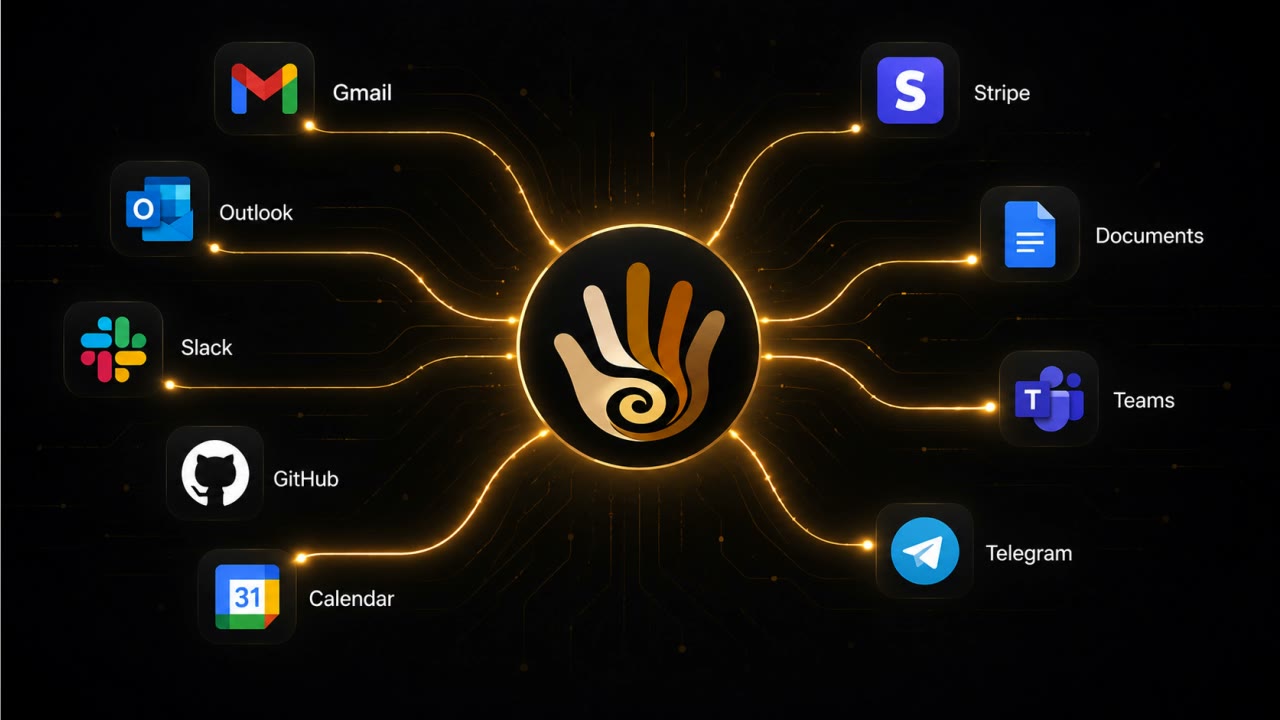
Email — Gmail, Outlook, or any IMAP provider — plus Slack, Teams, SMS, Telegram, Discord, your calendars, and more. And beyond channels: your screen and your meetings.

No. Cloud AI can be turned off at any time. With it off, everything — capture, search, transcription, briefs — runs on a local model on your machine.

Password fields are skipped at capture time — they never enter the database. Private and incognito browsing is detected and ignored. And you can exclude any app or website entirely, so what you keep out stays out.

No. It keeps text, not video — months of memory fit in the space a screen recorder burns through in a day. Where a window won't expose its text it reads a momentary snapshot and discards the image. Saving screenshots is optional; switch it on and they are encrypted on your own disk like everything else. Capture is passive and built to stay out of your way, including on battery.

Recall keeps a rolling archive of screenshots of your screen every few seconds and requires special Copilot+ hardware. Rewind was Mac-only and was discontinued after Meta acquired it. MyHandler keeps no image archive — it extracts the text and discards the picture; saving screenshots is optional, and when you enable it they stay encrypted on your own machine. It runs on any Windows 10 or 11 PC, and remembers more than your screen — meetings, files, and channels too. Read the full Recall comparison or the Rewind comparison.

Nothing dramatic — it was never ours to keep. Your memory lives in an encrypted database on your own disk, not on our servers. Cancel any time; the vault stays with you.

Because going deep beat going wide. Ambient capture done properly is serious per-OS engineering, and we started with Windows 10 and 11 — the platform the others skipped. macOS and Linux are coming.

Quietly on your side.

Windows 10 & 11 · Free to start · Mac & Linux coming soon

Uninstall can erase every trace — and there was never a cloud copy to chase.