내일 우리가 사라져도, 당신의 아카이브는 사라지지 않을 것입니다. 그것은 당신의 PC에 있는 파일 — 당신의 것이며, 암호화되고, 휴대 가능합니다.
Desktop 데이터는 절대 기기를 떠나지 않습니다. 채널은 암호화된 릴레이를 통해 전달되어 귀하의 기기에 도착한 뒤, 저희는 복사본을 삭제합니다. 우리는 그 어떤 데이터도 학습에 사용하지 않습니다.
그것은 당신이 열기를 기다리지 않습니다. 일정에 넣고, 어디서든 문자로 접근하거나, 키 하나만 눌러 대화하세요.
Message it on Telegram, SMS, Discord, or email and get answers pulled straight from your own machine — your files, meetings, and history. It reaches back the moment something needs you.
한 번만 알려주면, 쉬운 말로 작성하고 스스로 실행됩니다. “매일 아침, 들어온 내용과 다가오는 일정을 요약해 주세요.” 작업을 수행하고 보고합니다 — 화면 사용 시간에 맞추는 것이 아니라, 당신이 정한 일정에 맞춰.
키를 누른 상태에서 말하세요; 놓으면 마이크가 멈춥니다. 깨우기 단어 없이 항상 듣지 않습니다. 당신의 음성은 기기에서 바로 전사되며, 텍스트는 작성 중인 내용에 삽입됩니다. 자동으로 전송되는 일은 없습니다.
Your meetings are transcribed and remembered locally — no bot joins the call. Before the next one, it briefs you on where things left off.
스크린, 파일, 회의, 그리고 모든 채널 — 어디서든 질문할 수 있는 하나의 개인 메모리 안에 있습니다.
| 기능 | MyHandler | 리틀버드 | 되감기 | 그래놀라 | Wispr Flow |
|---|---|---|---|---|---|
| 디바이스 내 파일 인덱싱 | ✓ | — | — | — | — |
| 모든 채널, 이메일만이 아니라 | ✓ | — | — | — | — |
| 어디서든 문자로 연락 가능합니다 | ✓ | — | — | — | — |
| 예약된 작업을 실행합니다 | ✓ | — | — | — | — |
| 음성 입력을 모든 앱에 적용하기 | ✓ | — | — | — | ✓ |
| 귀하의 목소리가 기기에서 처리되었습니다 | ✓ | — | — | — | 클라우드 |
| 실시간 번역을 말하면서 입력하세요 | 30개 언어 | — | — | — | 후, 명령에 의해 |
| 데스크톱 데이터: 진정한 로컬 | ✓ | — | — | — | — |
| 여전히 독립적 | ✓ | ✓ | acq. Meta | ✓ | ✓ |
Rewind / Limitless는 2025년 12월에 Meta에 인수되었습니다. Wispr Flow는 클라우드 서버에서 오디오를 처리합니다; 번역은 이미 받아쓰기된 텍스트에 대한 별도의 음성 명령입니다.
인간 EA는 연간 $60–120K가 듭니다. 우리의 AI 어시스턴트는 월 $15에 제공되며 이메일, 회의, 화면 및 모든 채널을 지원합니다. 시작하려면 신용카드가 필요 없습니다.
Your screen activity, meeting transcripts, and files are captured, processed, and stored in an encrypted database on your machine. Email and channels sync down to your device through an encrypted relay that deletes its copy once delivered. With Cloud AI off, nothing is ever sent out for processing.
No. It never acts on your behalf and never sends anything. It drafts a reply only when you explicitly ask — and you decide what happens next.
Yes. Message it on Telegram or SMS and ask about your own data — "what did I quote the Acme job?", "when's my next meeting with Sarah?" The answer is pulled from the data on your own computer and sent back on the same channel. It also reaches out to you that way when something needs your attention.
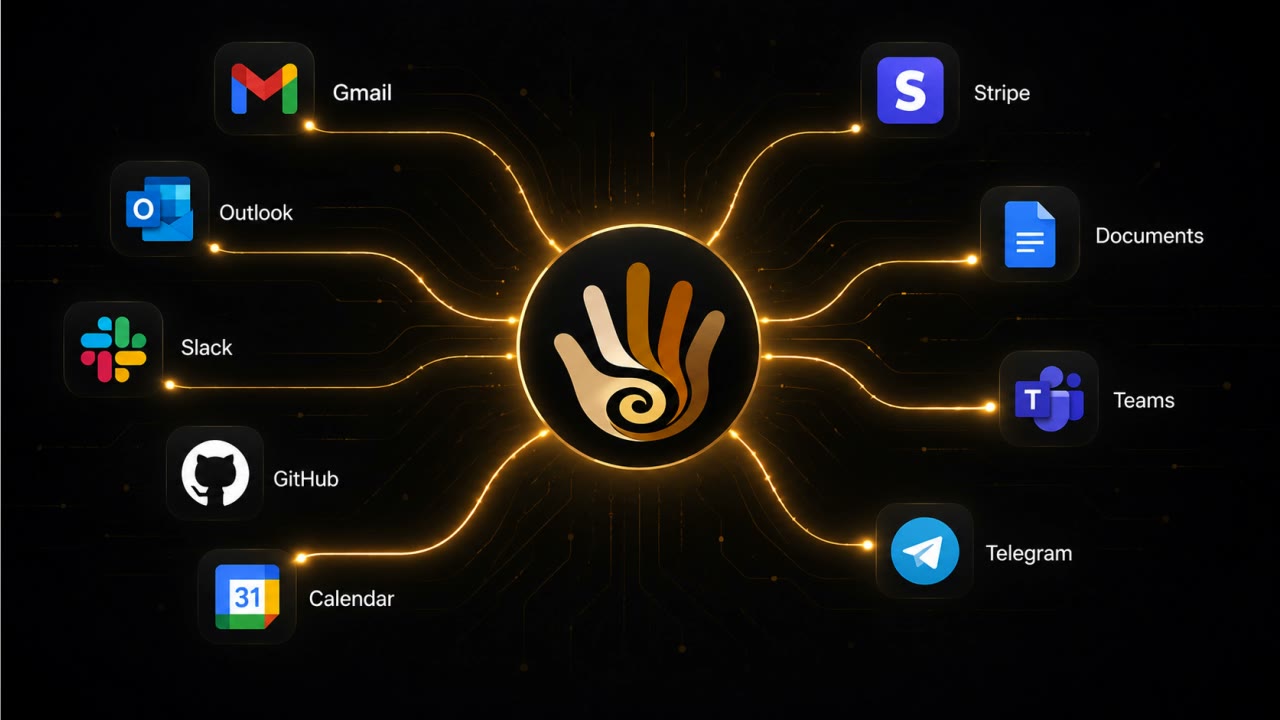
이메일 — Gmail, Outlook, 또는 any IMAP provider — plus Slack, Teams, SMS, Telegram, Discord, your calendars, and more. And beyond channels: your screen and your meetings.
No. Cloud AI는 엄격히 선택적입니다. 이를 끄면 캡처, 검색, 전사, 요약 등 모든 기능이 로컬 모델에서 귀하의 기계에서 실행됩니다.
Password fields are skipped at capture time — they never enter the database. Private and incognito browsing is detected and ignored. And you can exclude any app or website entirely, so what you keep out stays out.
아니요. 텍스트만 캡처하고 스크린샷이나 비디오는 캡처하지 않습니다 — 하루 동안 화면 녹화기가 차지하는 공간에 몇 달치 메모리가 들어갑니다. 캡처는 수동적이며 배터리 사용 중에도 방해되지 않도록 설계되었습니다.
Recall는 몇 초마다 화면의 스크린샷을 저장하며 특수 Copilot+ 하드웨어가 필요합니다. Rewind는 Mac 전용이었으며 Meta가 인수한 후 중단되었습니다. MyHandler는 이미지가 아닌 텍스트를 캡처하고 Windows 10 또는 11 PC에서 실행되며 화면뿐만 아니라 회의, 파일, 채널까지 기억합니다. 전체 Recall 비교 읽기 또는 the Rewind comparison.
Nothing dramatic — it was never ours to keep. Your memory lives in an encrypted database on your own disk, not on our servers. Cancel any time; the vault stays with you.
Because going deep beat going wide. Ambient capture done properly is serious per-OS engineering, and we started with Windows 10 and 11 — the platform the others skipped. macOS and Linux are coming.