Now available for Windows

Your own personal handler.
No billionaire required.

A private AI that lives on your computer. It knows everything you work with, forgets nothing, and answers to you from anywhere.

Your screen, your files, your meetings, your email and calendar — pulled into one private, encrypted memory that stays on your machine. Ask it from anywhere; it reaches back when something needs you. Nothing leaves your computer without your say-so.

AES-256-GCM encrypted Desktop data stays local Zero data retention No human access
The shift

The data has always been yours.
Now you can finally use it.

Your computer is a 500 GB filing cabinet of your professional life. Every email you've ever sent. Every contract you've signed. Every meeting you've taken. Every document you've written. It's all there.

Until now, no AI could touch it. ChatGPT doesn't know your inbox exists. Claude has never read your contracts. Microsoft Copilot wants you to upload everything to their cloud first — and good luck getting it back.

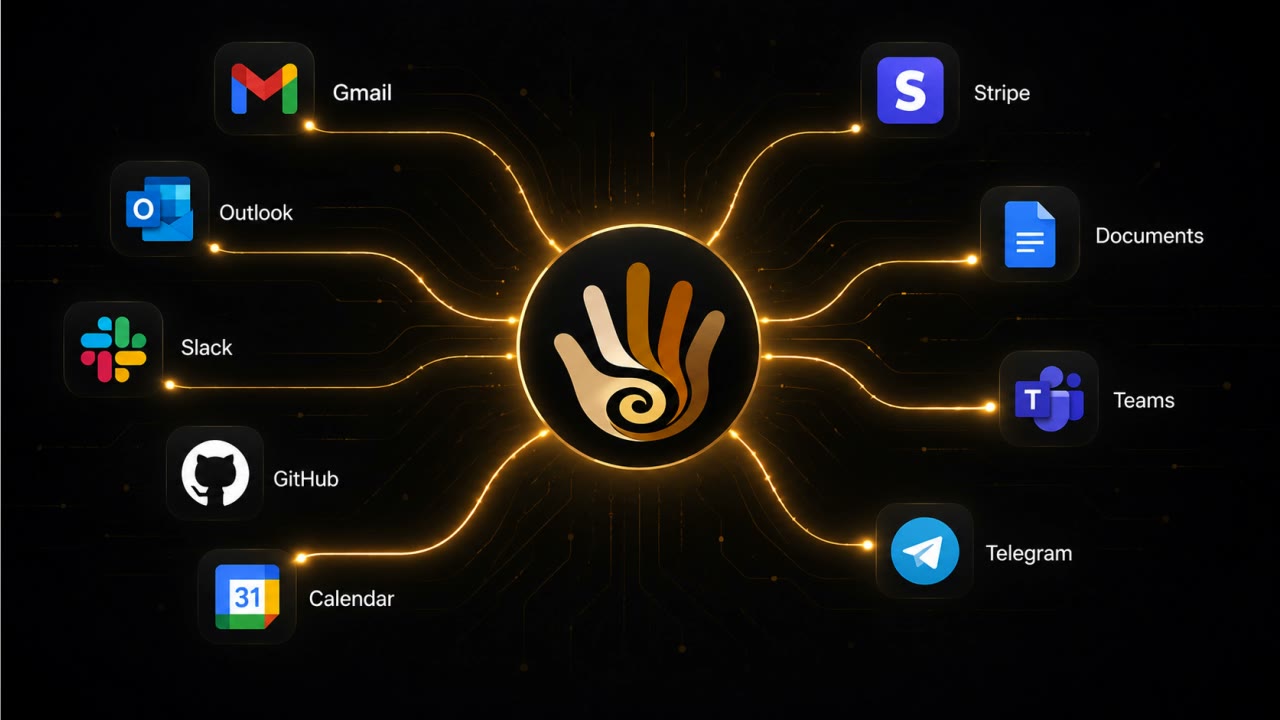
MyHandler runs on your machine. It reads what's already there — your screen, your files, your meetings — and connects it to the channels that live in the cloud (email, Slack, Teams), all under encryption you control. The smartest AI you've ever used, finally connected to the data that actually matters: yours.

500 GB
average laptop, indexed
0 bytes
uploaded to use it
200 ms
from question to answer
The landscape

Why MyHandler is the AI assistant
you actually want.

These products solve real problems. We just solve six more. MyHandler is the only AI gatekeeper that fuses all intelligence layers — desktop data local, channels encrypted, always running.

Rewind / Limitless
The Mac memory app — now owned by Meta.

Acquired by Meta in December 2025. The Rewind app shut down on Dec 19, 2025 — screen and audio capture disabled. EU, UK, and several other regions had accounts deleted entirely. The lesson: cloud-dependent memory apps die when the company sells.

Littlebird.ai
Watches your screen. Uploads it to AWS.

Continuous screen-reading and meeting transcription — stored in Amazon's cloud, not on your device. Strong context recall on Mac. No channel inbox, no cross-channel drafting, and your private screen data lives on someone else's servers.

Granola
Meeting notes only — no context from your email, Slack, or screen.

Strong post-meeting workflow, but doesn't know about the emails and Slack threads that led to the call. $14–18/user/month, meetings only.

Superhuman
A prettier inbox is still an inbox.

Beautiful UI, fast keyboard. Still requires you to open and process email. AI drafting from $30/mo — acquired by Grammarly in 2025. Email only — no other channels.

SaneBox
Reads email headers. We read the actual email.

Filters by sender and subject patterns. Zero understanding of content, intent, or urgency. No calendar awareness, no Slack, no screen intelligence.

MyHandler is the only private AI assistant that fuses screen intelligence (local) + meeting transcription (local) + on-device file & document indexing (local) + email depth (encrypted relay) + channel unification (encrypted relay) + relationship memory into one coherent system — desktop data always local, channels relayed to your device then deleted.

Your AI gatekeeper across 23+ channels

One AI assistant.
Six intelligence layers.

Every competitor covers one layer. Your AI handler runs all six — desktop data local, channel data encrypted, across 23+ integrations.

Local & private
Screen Intelligence

UI Automation text extraction — no screenshots, no camera, no images. Detects OTPs and copies them automatically. Surfaces actionable items as they appear. Tracks commitments, deadlines, and numbers before you forget them.

"Your AI assistant sees what you see — and remembers what you forget."
Local & private
Documents & Files

Index user-selected folders on your machine. Full-text and vector search, all on-device. Find the contract you signed last March, the proposal from Q2, the spec you wrote two laptops ago — Ctrl+K, 200ms, never leaves your computer.

"Your handler reads your filesystem so you don't have to."
Local & private
AI Meeting Assistant

Transcription runs entirely on your machine with whisper.cpp — no bot joins your call, no notification to anyone else. A pre-meeting brief surfaces who's in the room and your history with them, minutes before you join. Afterward, the action items are pulled out for you.

"No bot. No upload. Just a quiet local transcript."
Cloud, AES-256 encrypted
Email & Channel Intelligence

Five-level AI triage across 23+ channels — email, Slack, Teams, SMS, WhatsApp. The noise is filtered out; only what genuinely needs you ever surfaces.

"121 emails a day. It reads every one. You read the five that matter."
Cross-source synthesis
Relationship Intelligence

Auto-built contact profiles from every source — email, Slack, Teams, calendar. Sentiment tracking with baseline anomaly detection. Communication style learned per contact.

"Your AI chief of staff knows you emailed Tuesday, Slacked Wednesday, and they're cooling on the deal."
The real moat
Memory & Context

Episodic memory with vector search. Every piece of context available the moment it matters.

"Search and find anything that you've seen, typed or heard."
Have you texted your computer today?

Knowing everything
is just the start.

Your Handler doesn't wait for you to open it. Put it on a schedule, reach it by text from anywhere, or just hold a key and talk.

Two-way reach
Text your Handler

Message it on Telegram, SMS, WhatsApp, or email and get answers pulled straight from the data on your computer — your files, your meetings, your history. And it reaches back out to you the moment something needs you.

"What did I quote the Maple Street job?" — answered from a file on your laptop, in seconds.
Set it and forget it
Scheduled Jobs

Tell it once, in plain language, and it runs on its own. "Every three hours, recap what's come in and what's coming up." "Every morning, check for new listings that match my buyer." It does the work and reports back.

Recurring research, briefings, and reminders — on your schedule, not your screen time.
Press to talk
Voice Dictation

Hold Ctrl+Alt+D and speak; let go and the mic stops. No wake word, nothing always-listening — a badge shows the moment it goes live. Your voice is transcribed right on your device, so the audio never leaves your machine, and the text drops into whatever you're writing. It never sends anything on its own.

Talk when your hands are full, type when they're not — the mic only ever listens while you hold the key.
How it works

Two minutes to set up.
Two days to be indispensable.

No configuration wizards. No manuals. Your AI handler starts working the moment it's connected.

Step 1
Install & Connect

Download the Windows desktop app. Connect your email, Slack, Teams. One wizard, under 2 minutes. Your AI handler begins watching immediately — screen, meetings, channels, all at once.

Takes → Under 2 minutes
Step 2
Your Handler Learns

Watches your screen locally. Listens to meetings locally. Reads your channels with encryption. Builds contact profiles automatically. Gets smarter every hour — your priorities, your voice, your context.

Continuous → Gets smarter every hour
Step 3
You Stay in Control

Nothing is sent, shared, or acted on without your explicit approval. Your AI assistant proposes. You decide. Review drafts, adjust classifications, approve actions — in seconds, not minutes.

Always → Nothing happens without your OK
A real day

What your AI assistant does
while you live your life.

Without your handler
7:30 AM Open inbox. 47 unread. Coffee gets cold while you triage.
8:47 AM Forgot to reply to Sarah. She's mentioning it in Slack now. You apologize.
9:00 AM Meeting in 3 minutes. Scramble for the pre-read you never opened.
9:55 AM Meeting ends. No notes taken. Action items will be forgotten by lunch.
11:00 AM Hunt through 4 folders for that contract. 12 minutes gone.
2:00 PM You promised a reply 3 days ago. Still haven't sent it.
5:30 PM Still 121 emails. 40 unread. You carry the weight home.
With your AI assistant
7:30 AM Handler briefing arrives: 3 items need you. 47 handled silently.
8:47 AM "Sarah's been waiting since Monday." You reply before she has to chase you.
9:00 AM Meeting in 5 min. Your Handler surfaces context from 3 channels.
9:55 AM Post-meeting: action items extracted, the open question flagged for you.
11:00 AM From your phone: "What did I quote Acme?" Answered from a file on your laptop, in seconds.
2:00 PM Stale thread alert: "You promised a reply 3 days ago. No answer yet."
5:30 PM 121 emails processed. 5 needed your attention. Done.
The honest comparison

Every AI assistant competitor
solves one piece of the puzzle.

We built all six layers. Desktop data local. Channel data encrypted. At $15/month vs. Superhuman's $30 — and we cover 10× more than email.

Feature MyHandler Littlebird Rewind* Granola Superhuman
Screen intelligence ✓ Local ✓ Cloud Was cloud — now Meta
On-device file indexing ✓ Local
Meeting transcription ✓ Local ✓ Cloud Was cloud — now Meta ✓ Cloud
Deep email intelligence Inbox only
23+ channels Email only
Reachable by text from anywhere
Runs scheduled jobs for you
Relationship memory
Pre-meeting briefs
Desktop data: truly local
No bot joins calls N/A
Still independent Acquired by Meta* Acquired by Grammarly*
Price $15/mo From $20/mo Discontinued $14–18/mo $30–40/mo

*Rewind / Limitless was acquired by Meta in December 2025; the Mac app shut down Dec 19, 2025. Superhuman was acquired by Grammarly in October 2025.

Privacy by architecture

Local where it can be.
Encrypted where it can't.

Desktop data never leaves your device. Channel data passes through an encrypted relay and lands on your device — then we delete our copy. Either way, only your AI assistant can read it, and we never train on any of it.

Desktop data stays on your device

Screen content, file indexes, and meeting transcriptions are stored in an encrypted local database on your machine. All queries against local data run through a local AI model (Qwen 3) — no network calls, no cloud roundtrip. You can optionally switch to MyHandler Cloud AI for faster inference, but local is the default.

Channel data: relayed, then deleted

Email, Slack, Teams, WhatsApp, and every connected channel pass through our servers encrypted — AES-256-GCM, column-level — held only until your desktop pulls them into your local database. Once your device has them, our copy is permanently deleted, within minutes. We can't read it, we don't train on it, and it never becomes a third-party AI provider's stored data.

Zero Data Retention on cloud AI

Your messages are discarded the instant the AI is done thinking. Nothing is stored, nothing is sold, nothing trains future models. Classification and drafting run through Groq under Zero Data Retention; embeddings are computed locally on your device. Across every cloud path, your data is never accessible to a human.

No bot, no screenshot

Screen capture via UI Automation — text extraction only, no images, no screen recording. Meeting capture via system audio — no bot joins, no notification to other participants. No camera access. No keylogging.

Prompt injection defense

Adversarial emails trying to hijack your AI gatekeeper? Caught before they reach the model. Multi-layer detection on the cloud path; a stricter privacy filter on Desktop's local model.

Windows Credential Manager

Encryption keys for both local and cloud data stored in OS-level secure storage — not in a config file, not in the cloud. On your machine, in the vault Windows already protects with your login credentials.

What we DON'T do
No screenshots
No keylogging
No camera access
No data sold
No training on your data
No human reads your email
No bots joining calls
What runs where
LOCAL AI (default)
Screen & UI Automation data
Indexed document search
Meeting transcription
Vector embeddings (on-device)
Local data queries (Qwen 3)
CLOUD AI (default for channels)
Email classification & drafting (Groq ZDR)
Slack / Teams / SMS processing (Groq ZDR)
Cross-channel intelligence (Groq ZDR)
Pre-meeting brief synthesis (Groq ZDR)
Optional: route local-data queries through MyHandler Cloud AI for faster inference (off by default, toggled in Privacy settings).
Data transparency

Where your data
actually lives.

Most companies say "private" and leave it there. Here's the exact breakdown — no marketing language.

TIER 1 — LOCAL (your machine)
Screen content UI Automation, text only — no images
Documents & files user-selected folders, indexed locally
Meeting transcripts whisper.cpp, on-device, no network
Vector embeddings ONNX on-device, never uploaded
Local AI Qwen 3 4B — default, always local
Storage SQLCipher AES-256 — key in Windows Credential Manager
Stays on your machine. Always.
TIER 2 — RELAY (encrypted, transient)
Email encrypted relay — deleted after sync
Slack / Teams encrypted relay — deleted after sync
SMS / WhatsApp encrypted relay — deleted after sync
Calendar encrypted relay — read-only
Cloud AI Groq ZDR for inference
Relayed, then deleted. It lives on your device.

Your email already lives on Gmail or Outlook's servers — we don't add a second permanent copy. We relay it to your device encrypted, then delete ours. Everything we can keep on your machine, we do.

The reality

AI already reads your email.
We're just honest about it.

Every major email provider runs an AI assistant on your messages. The difference? Their AI serves their platform. Your Handler serves you.

1.8B
Gmail users

Every Gmail message is processed by AI for spam filtering, Smart Compose, Smart Reply, summaries, and categorization. Google holds all decryption keys.

376B
emails / day

Processed by AI systems worldwide for spam, phishing, and malware detection. Without AI filtering, 46.8% of your inbox would be spam.

4–6
copies of every email

Your messages already live on sender servers, recipient servers, backups, datacenter replicas, and device caches. Yahoo stores yours unencrypted.

75%+
lack strong encryption

Email (SMTP) is hop-by-hop — each relay server can see your message in plaintext. Only a fraction has strong authenticated end-to-end encryption.

Pricing

$15/month for your own
AI chief of staff.

A human EA costs $60–120K/year. Our AI assistant costs $15/month — and covers email, meetings, screen, and 23+ channels. No credit card to start.

Free
$0
forever

See what your Handler can do.

Get Started
Most Popular
Personal
$15
/ month

For professionals who mean business.

Get Started
Business
$29
/ month

Full power. Zero compromises.

Get Started
Executive
$59
/ month

Your Handler, fully unleashed.

Get Started
AI classifications / month 100 1,500 5,000 15,000
Email channels 1 3 10 Unlimited
Calendar integration
Smart screening & DND
Voice receptionist (min / month) 1 30 120
Free
$0 forever
Get Started
  • 100 ai classifications / month
  • 1 email channels
  • Calendar integration
  • 1 voice receptionist (min / month)
Most Popular
Personal
$15 / month
Get Started
  • 1,500 ai classifications / month
  • 3 email channels
  • Calendar integration
  • Smart screening & DND
Business
$29 / month
Get Started
  • 5,000 ai classifications / month
  • 10 email channels
  • Calendar integration
  • Smart screening & DND
  • 30 voice receptionist (min / month)
Executive
$59 / month
Get Started
  • 15,000 ai classifications / month
  • Unlimited email channels
  • Calendar integration
  • Smart screening & DND
  • 120 voice receptionist (min / month)
Questions answered

The things you actually
want to know.

?Do you read my emails?
Yes — that's the whole point. Your AI assistant reads every message so you don't have to. But no human ever sees your messages. Channel data is AES-256-GCM column-encrypted as it passes through our relay and mirrored down to your Desktop in a SQLCipher-encrypted SQLite — then our copy is deleted within minutes. Your data never trains AI models. Classification runs on your Desktop — through Groq under Zero Data Retention when Cloud AI is on, or a local model on your machine when it's off. Embeddings are computed locally on your device.
?How is this different from Littlebird, Rewind, or Granola?
They each solve one piece. Littlebird does pre-meeting briefs. Rewind recorded your Mac screen — until Meta acquired its parent company (Limitless) in December 2025 and shut the app down. Granola takes meeting notes. MyHandler combines all six intelligence layers — screen, meetings, and on-device file indexing stay local on your device; email and channels sync down to your device through an encrypted relay that deletes its copy once your Desktop has it. One system, honest about where each piece lives. And we're not owned by Facebook.
?Does a bot join my meetings?
No. Your AI meeting assistant uses system audio capture to transcribe meetings locally using whisper.cpp. No bot joins. No "Notetaker has joined the meeting." No notification to other participants. The transcription runs entirely on your device, never touches the network.
?What happens to my screen data?
Screen data is captured via UI Automation — text extraction only, no screenshots, no images. It's processed locally on your machine, stored in an encrypted local SQLite database, and never sent to any server. Your screen content stays on your device, period.
?Does it listen to me?
Only when you ask it to. There's no wake word and nothing always-listening. The microphone stays off until you hold Ctrl+Alt+D to dictate, and an on-screen badge shows the entire time it's live. Your voice is transcribed right on your device with whisper.cpp, so the recording never leaves your machine — let go of the key and the mic stops. Turning what you said into a polished draft uses cloud AI when it's switched on, exactly like the rest of MyHandler, but the audio itself is only ever processed locally.
?Is everything really local?
No — and we'd rather be honest about it. Your screen content, indexed documents, meeting transcripts, and vector embeddings are stored locally in an encrypted SQLite database on your machine. Qwen 3 runs on your device to query them — zero network calls. Your email, Slack, Teams, SMS, WhatsApp, and calendar arrive through our encrypted relay so nothing is missed while you're offline — then they sync into your local database and our copy is deleted within minutes. Your device is where they live; our server only passes them through. No hand-waving.
?Why can't channels be local-only?
Because email and Slack already live in the cloud — they're not on your machine, they never were. Gmail, Outlook, Slack, and Teams are cloud services. We receive them on an encrypted relay so nothing is missed while you're offline, then sync them down into your local database and delete our copy within minutes. The classifying and reasoning happen on your desktop, not our server. We don't pretend Gmail lives on your laptop — we just bring a copy down to it, encrypted, and let go of ours.
?Can I force local AI for everything?
For local data (screen, files, meetings) — yes, always. Qwen 3 on your device is the default and can't be overridden by anyone but you. Your channels are classified on your desktop as well — through Groq under Zero Data Retention when Cloud AI is switched on, or a local model on your machine when it's off. Cloud AI is a single toggle in Privacy settings; turn it off and nothing about your channels or your local data is sent to a cloud model.
?Do I need the Windows desktop app?
Yes — MyHandler is the desktop app. Your screen, files, meetings, email, and channels all come together in an encrypted database on your own machine, and that's where the intelligence runs. You sign up and connect your channels on the web, but the product itself is the Windows app. Mac and Linux support is on the roadmap — we're building Windows first and being honest about it.
?What if I switch to Mac?
Mac support is on the roadmap. We're being honest: Windows only right now. MyHandler is a desktop app, so the Mac build is what unlocks it for you — there's no web version to fall back on. If you're primarily on Mac, hold tight: we're building Windows first and would rather ship the Mac app right than fake a browser version.
?How is this different from Gmail filters?
Filters are static rules you write once and forget. MyHandler is an AI gatekeeper that learns your actual behaviour — who matters right now, what's genuinely urgent, how your priorities shift over time. It adapts continuously. Filters can't watch your screen, attend your meetings, or remember what you discussed on Slack last Tuesday.
?Which email providers are supported?
Microsoft Outlook via OAuth, plus email forwarding for Gmail, Yahoo, ProtonMail, and every other provider. One AI handler for all your inboxes — email, Slack, Teams, SMS, WhatsApp, and 18+ more channels.
?Can I control what my AI assistant does?
Completely. Your Handler never sends anything on its own. When you ask it to draft or send something, it shows you first — approve, edit, or skip it. Re-classify anything the AI got wrong and it learns. Your AI assistant, your rules.
?Can I really just text my Handler?
Yes. Message it on Telegram, SMS and ask about your own data — "what did I quote the Acme job?", "when's my next meeting with Sarah?", "recap that thread." The answer is pulled from the data on your own computer and sent back on the same channel. Your Handler also reaches out to you that way when something needs your attention.
?How do scheduled jobs work?
Describe a recurring task in plain language and pick how often it runs — "every morning, summarize new email", "every hour, check for listings matching my buyer's criteria." Your Handler runs it on schedule and delivers the result in the app, or to a channel of your choice. No scripting, no setup.
?I have a question that's not here.
Email hello@myhandler.ai and you'll hear back from a human — usually within a day, often within an hour. We're a small team and we read every message.
EST. 2026 — MYHANDLER.AI

The 1% have always had someone
managing their world. Get yours.

Your AI assistant keeps your screen and meetings local, syncs your channels down to your device through an encrypted relay, attends your meetings silently, and surfaces only what needs your brain. Nothing is ever sent without your approval. You'll wonder how you managed without it.

Download for Windows Create an account
Free for Windows 10 and 11. macOS and Linux coming soon.