Your AI handler,
running where your data lives.
MyHandler Desktop reads your screen, transcribes your meetings, and indexes your documents — all locally and encrypted. Connect your email, calendar, and messaging channels, and it surfaces only what actually needs you.
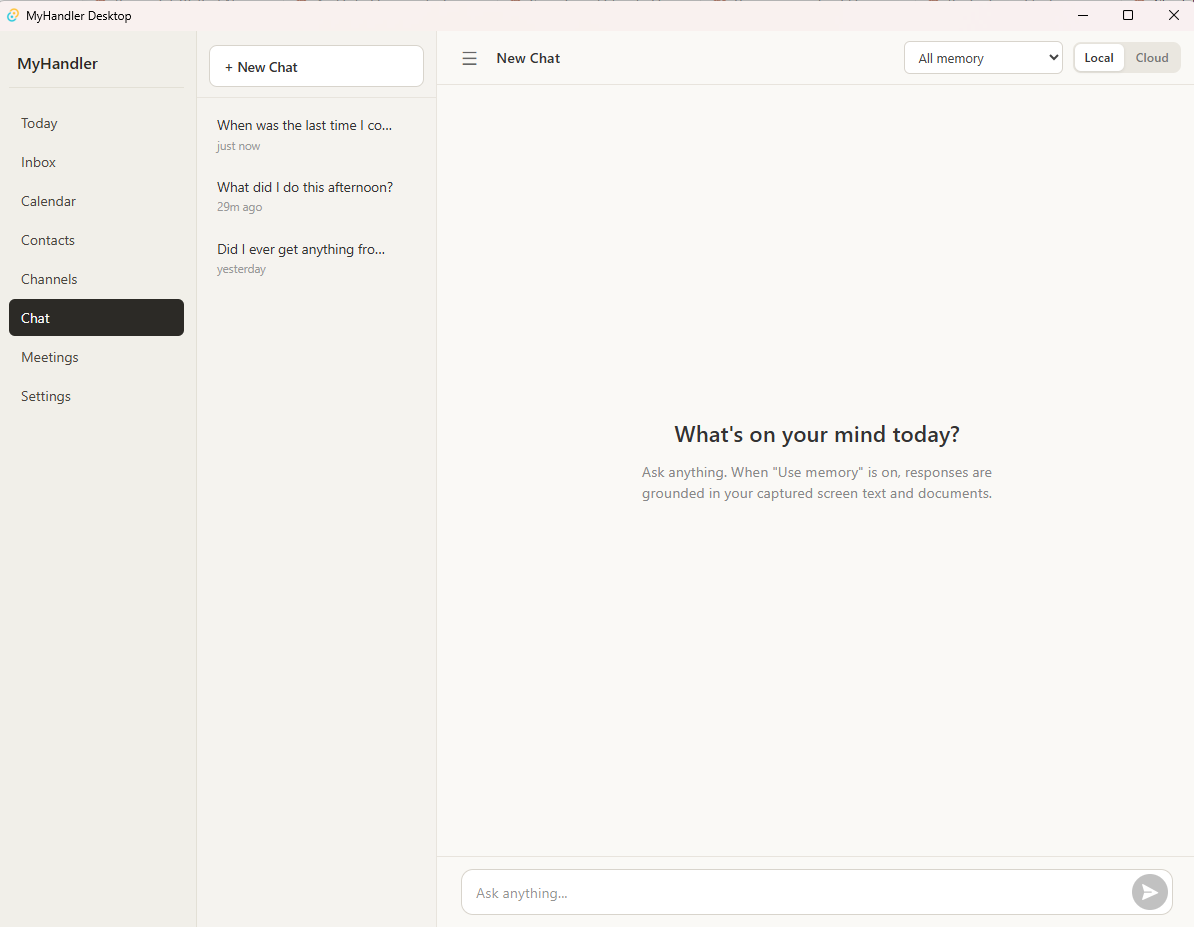
Four engines.
One handler.
Reads your screen, text first
Captures text through Windows accessibility APIs — the same ones screen readers use. Where a window won’t hand over its text — a map, a remote desktop, an app that paints its own text — it reads a momentary snapshot on your device and discards the image, keeping only the words. Nothing is recorded. Storing the pictures is optional and off until you turn it on; when you do, they are encrypted on your own disk. Apps you exclude stay invisible.
Transcribes your meetings
Captures both your mic and the system audio in parallel — Zoom, Google Meet, Webex, GoToMeeting, and other video calls. Whisper.cpp runs locally; audio never leaves your computer. Speakers tagged "Me" vs "Others".
Indexes your documents
Point it at folders. It reads PDFs, .docx, .xlsx, .csv, plaintext, and .eml files, builds a full-text and semantic index, and searches across everything you've captured, said, and saved.
Brings your channels home
Your email, calendar, contacts, and messaging accounts arrive through our encrypted relay and sync down to an encrypted local database on your machine — then our copy is deleted. Search and read offline. Live updates over SignalR when you're online.
We didn't add privacy.
We started with it.
These aren't features we could turn off. They're constraints we built around.
Local capture works with zero network
Disconnect your computer. Screen capture, meeting transcription, document indexing, and local search keep working. Cloud channels resume the moment you're back online.
We read your screen. We don’t keep it.
Other tools record your screen and keep it — a rolling archive of images or video. We don’t. Text comes primarily from Windows accessibility APIs; where a window won’t expose it, we read a momentary snapshot on your device and throw the picture away, keeping only the text. Nothing is recorded or sent. Every captured snippet, transcript, document chunk, and embedding lives in an encrypted SQLite database (AES-256, key in Windows Credential Manager).
Cloud channels are opt-in
Channel integrations only run if you connect them. We will never default cloud sync on. Disconnect any time — your local memory stays yours.
Same handler. Two surfaces.
Sign in with your MyHandler.ai account and the cloud handler kicks in: every inbound email is sorted by importance before you see it, you can text your Handler from your phone and it answers from everything it knows about you, and your local Desktop context sharpens every cross-channel query. Need a reply? Ask, and it drafts one in your voice for you to edit and send yourself — drafting only ever happens when you invite it, and nothing leaves your machine on its own.
Context, on demand.
Click the Zap icon in the sidebar. The Sidekick floats over your work and shows you who you're talking to, your recent threads with them, and any commitments coming due. Pulled from your local database — no network round-trip.
It notices things you'd miss.
Meeting starting? Toast with a one-click "record" button. A promise you made coming due? Toast. Everything triggers locally, dismissable, never blocking your work.
Not Rewind. Not Littlebird.
| Approach | MyHandler Desktop | Rewind | Littlebird |
|---|---|---|---|
| Keeps your screen as | Text only — images read, then discarded | Archived pixel screenshots | Recorded video |
| Local-only capture by default | ✓ | ✓ | Cloud-assisted |
| Encrypted SQLite at rest (AES-256) | ✓ | Disk-level only | Cloud-side |
| Local LLM inference | ✓ | — | — |
| Local meeting transcription | ✓ | ✓ | ✓ |
| Local document indexing | ✓ | — | — |
| Connects to a cross-channel cloud handler | ✓ | — | — |
Comparison based on publicly documented behavior at the time of writing. Trademarks belong to their respective owners.
Local capture, meeting transcription, document indexing, on-device search. A free MyHandler.ai account is all you need.
Email triage, on-demand reply drafting in your voice, texting your Handler from your phone, and the cross-channel handler. How many channels and how much usage you get is set by your plan.
Built for modern Windows.
- Operating system Windows 10 (1809+) or Windows 11
- CPU x64, 2019 or newer (Zen 2 / 10th-gen Intel or newer)
- Memory 8 GB minimum, 16 GB recommended
- Disk 50 MB installer; 3–5 GB after first-run model download
What happens after you click.
Run the installer
Around 50 MB, code-signed, and it installs for your Windows account only — no administrator password, nothing dropped into system folders. If your PC doesn't have Microsoft's WebView2 runtime yet, the installer fetches it.
First launch sets itself up
No setup wizard — it opens straight to Home. In the background it downloads the speech and language models it runs on, 3–5 GB once, and everything it captures from then on lives in an encrypted database on your own disk.
Updates arrive on your terms
MyHandler checks for new builds and offers them in a toast — you pick the moment to install, or turn checking off entirely in Settings. Every update is signature-verified before it's allowed to run.
Everything you'd forget,
kept by something that doesn't.
Download free for Windows
Questions, answered.
Is MyHandler Desktop really free?
Yes — free forever, no credit card. Local capture, transcription, document indexing, and on-device search run on a free MyHandler.ai account. Cloud features — email triage, on-demand reply drafting, reaching your Handler from your phone, and the cross-channel handler — come with paid tiers, and your plan sets the usage limits.
How is this different from Rewind or Littlebird?
They keep pixels of your screen — an archive you didn’t ask for. We extract the text and throw the picture away; keeping screen images is a switch you control, encrypted on your own disk if you use it. Text primarily from Windows accessibility APIs, encrypted SQLite at rest, models running on your CPU or GPU. Plus a cross-channel cloud handler — email triage, on-demand reply drafting, text your Handler from your phone — that other local-first tools don’t have.
Does my data leave my computer?
Local capture, transcripts, and document content stay on disk. Channel data (email, calendar, messaging) is fetched from those providers, relayed through our encrypted servers, then synced down to your local encrypted SQLite — and deleted from our servers within minutes of your device receiving it. Queries to the cross-channel handler include only the context you ask about.
Where do the AI models run?
Locally for transcription (whisper.cpp) and local inference (llama.cpp). The cross-channel cloud handler uses Groq-hosted models with Zero Data Retention. Nothing about your screen, audio, or document content gets shipped to a third-party model.
What about macOS and Linux?
Windows-only today. Both are on the roadmap — tell us which you need when you sign up.